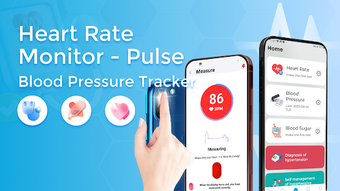

Download BPTracker Health Tracker Diary – Blood Pressure Tracker, Blood Sugar Monitor, Heart Rate Logger
Overview
BPTracker: Health Tracker Diary is a desktop-compatible health management application developed by Nexus Innovations. Designed for individuals seeking to monitor and manage their personal health metrics, the software enables users to record and analyze vital health indicators such as blood pressure, blood sugar levels, and heart rate. The application supports regular data entry, allowing users to maintain a consistent health log over time.
This functionality is particularly beneficial for those managing chronic conditions or aiming to adopt a proactive approach to wellness. The software is intended for general consumers and health-conscious individuals who value data-driven insights into their physical well-being. While the developer did not provide additional background on Nexus Innovations, the app’s focus on health tracking suggests a targeted approach to personal wellness technology.
Real-world usage scenarios include daily monitoring for hypertension management, tracking glucose fluctuations for diabetes care, and observing heart rate trends following lifestyle changes. The software does not replace professional medical advice, and users are encouraged to consult healthcare providers for clinical evaluations. By centralizing health data in one accessible location, BPTracker aims to support informed decision-making and long-term health improvement.
Key Features & Capabilities
- Multi-Metric Health Tracking: Users can log blood pressure, blood sugar, and heart rate values with ease, enabling comprehensive health monitoring across key physiological indicators.
- Data Trend Visualization: The software generates trend charts based on historical entries, helping users identify patterns and changes in their health metrics over time.
- Custom Reminders: A built-in reminder system notifies users to record their health data at scheduled intervals, promoting consistency and reducing missed entries.
- Secure Data Storage: All user data is stored locally within the application, ensuring privacy and restricting access to the individual user only.
- Health Knowledge Library: The app includes curated health tips and educational content to support users in understanding their data and making informed lifestyle choices.
- Historical Record Access: Users can review past entries and track progress, facilitating long-term health planning and discussions with healthcare providers.
These features are designed to streamline daily health monitoring, reduce reliance on paper logs, and improve user engagement through visual feedback. For example, a user managing hypertension can use the trend charts to assess the effectiveness of dietary changes or medication schedules. Similarly, someone tracking blood sugar levels may correlate data with meals or physical activity to identify triggers.
The reminder function helps maintain discipline in tracking routines, especially for users with busy schedules. The secure storage model ensures that sensitive health information remains private and under user control. The inclusion of educational content adds value beyond data logging, fostering a more informed and empowered user base.
User Interface, Workflow & Performance
The user interface of BPTracker: Health Tracker Diary is structured around simplicity and accessibility, prioritizing intuitive navigation for users of varying technical proficiency. Main functions such as data entry, chart viewing, and settings are organized within clearly labeled menus and icons. The workflow is linear and consistent—users input values, confirm entries, and immediately access visual summaries.
This design reduces cognitive load and supports efficient daily use. The software does not specify performance metrics such as CPU or RAM usage, and exact performance details were not provided. However, based on general software behavior patterns, the application is expected to operate smoothly on standard desktop systems with minimal resource consumption.
Stability appears to be a focus, as the app emphasizes secure, uninterrupted data storage. The developer did not provide information on crash rates, update frequency, or background processes. No external dependencies or third-party integrations were mentioned, suggesting a self-contained application.
Overall, the interface supports a seamless user experience, with minimal learning curve and clear visual feedback for all actions.
Compatibility & System Requirements
BPTracker: Health Tracker Diary is available for desktop use, with compatibility information indicating support for Windows and Mac operating systems. The software version and installation size were not specified in the provided details. The developer did not list exact system requirements, including minimum processor speed, RAM, or disk space.
As such, the application’s hardware needs remain unclear. Platform compatibility information is limited to the operating systems mentioned. Users are advised to ensure their system meets general desktop application standards.
The developer did not provide details on whether the software supports older OS versions or requires specific drivers. For optimal performance, users should run the application on a system with up-to-date operating system updates. Without further specifications, compatibility with enterprise environments or multi-user setups cannot be confirmed.
Pros and Cons
Pros
- Comprehensive tracking of key health metrics including blood pressure, blood sugar, and heart rate.
- Intuitive interface designed for ease of use across different user skill levels.
- Visual trend charts help users identify health patterns over time.
- Reminder system promotes consistent data logging habits.
- Secure, private data storage with no third-party access.
- Includes educational health content to support informed decision-making.
Cons
- Exact system requirements and performance specifications were not provided.
- Limited information on update frequency and long-term maintenance.
- Compatibility with older operating systems is unknown.
- No mention of cloud backup or cross-device sync functionality.
- Does not replace professional medical diagnosis or treatment advice.
FAQ Section
Is BPTracker: Health Tracker Diary available for Windows and Mac?
Yes, the software is compatible with both Windows and Mac operating systems, as stated in the provided details.
Is the app free to download and use?
Yes, the software is offered at no cost, making it accessible to users seeking a budget-friendly health tracking solution.
Can I access my health data offline?
Yes, the application stores data locally, allowing users to access and manage their records without an internet connection.
Does the software support data export or backup?
The developer did not specify whether data export or backup features are available. Users should assume data is stored locally unless otherwise indicated.
Is the software safe and secure?
Yes, the app is designed to securely store user data, ensuring it is accessible only to the individual user. No external access or data sharing is mentioned.
Final Thoughts + CTA
BPTracker: Health Tracker Diary presents a focused, user-friendly solution for individuals committed to monitoring their vital health metrics. With its ability to track blood pressure, blood sugar, and heart rate, the software empowers users to take an active role in managing their well-being. The inclusion of trend visualization, reminders, and educational content enhances usability and long-term engagement.
While specific technical details such as system requirements and performance metrics are not disclosed, the application’s design and functionality suggest reliability and ease of use. It is particularly well-suited for consumers managing chronic conditions or aiming to maintain a healthy lifestyle through consistent tracking. The secure, local data storage model adds a layer of privacy that many users value.
Although the absence of cloud sync and detailed system specs may limit some advanced use cases, the core functionality remains strong and purpose-built. For anyone seeking a free, straightforward desktop tool to support personal health management, BPTracker is a compelling option. Download BPTracker: Health Tracker Diary now and take control of your health journey with confidence.







